PhonePe has completely changed the way India pays.
No more carrying cash. No more “exact change nahi hai” moments. Just scan a QR code and the payment is done in seconds. UPI has made life genuinely easier for millions of Indians — from big city professionals to small town shopkeepers.
But where there is convenience, there are also scammers.
While UPI was growing, fraudsters were quietly finding ways to exploit people’s trust in digital payments. And their method? Shockingly simple.
A fake screenshot.
That’s it. Just a manipulated image on a phone screen.
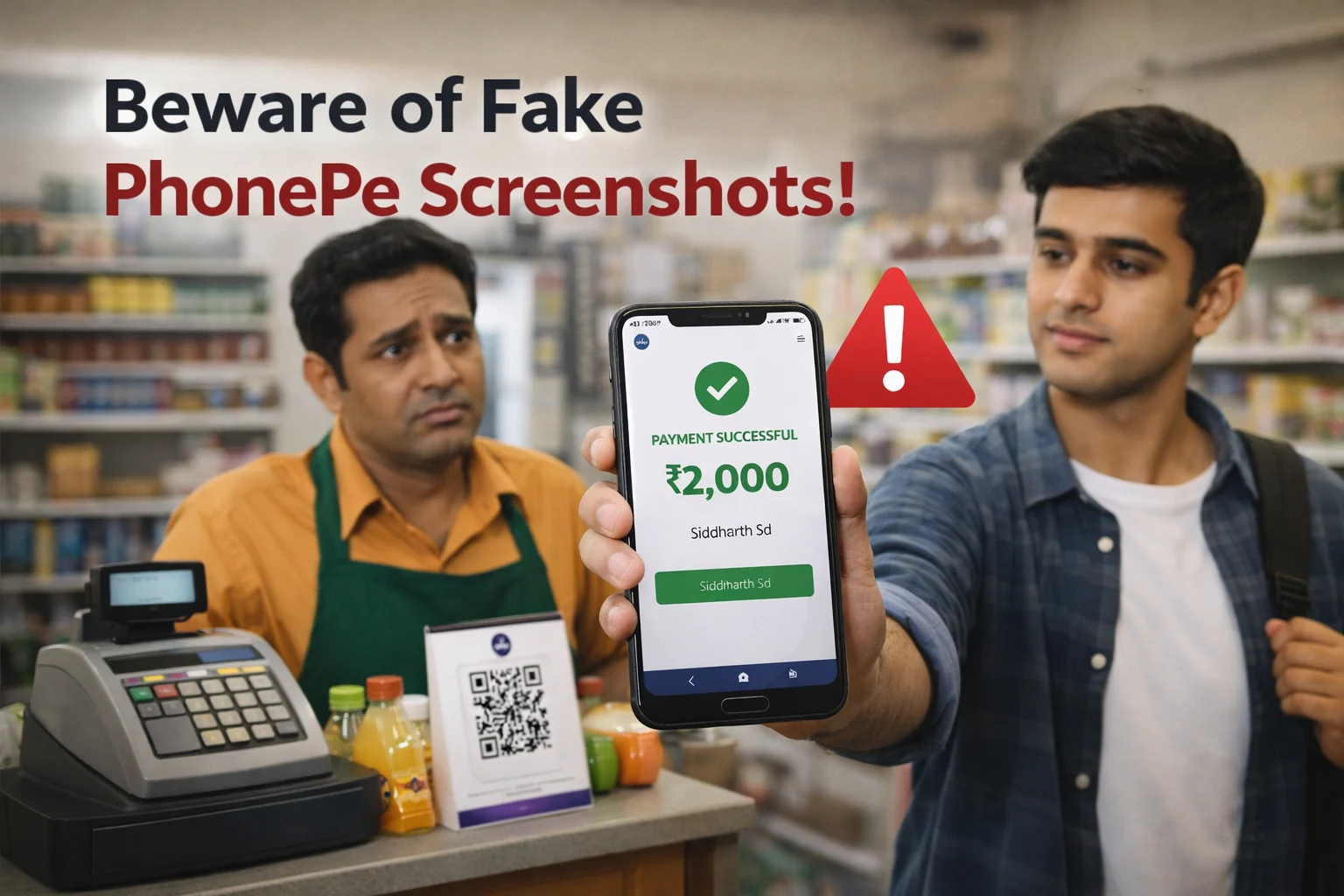
A fraudster walks into a shop, buys goods worth thousands of rupees, shows a “Payment Successful” screen — and walks out. No money was ever sent. Not a single rupee reached the shopkeeper’s account.
And this isn’t rare. This is happening every single day —
- In local markets and kirana stores
- On OLX and Facebook Marketplace deals
- At petrol pumps and roadside stalls
- In WhatsApp transactions between strangers
Shopkeepers, freelancers, and small business owners across India are losing their hard-earned money — simply because they trusted a screenshot instead of checking their own bank account.
If you accept UPI payments in any form — this guide is a must-read.
We’ll cover:
- Real examples of fake PhonePe screenshots
- How scammers create them
- How to verify every payment safely
- How tools like ScamDekho can help you stay protected
What Is a Fake PhonePe Screenshot?
Imagine someone shows you their phone. The screen says:
“Payment Successful — ₹2,000 Sent”
It has your name on it. A transaction ID. A timestamp. It looks 100% real.
But not a single rupee has left their account.
That is exactly what a fake PhonePe screenshot is — a manipulated or AI-generated image made to look like a real payment confirmation. Everything you see on that screen is fabricated:
- The payment amount
- The sender and receiver names
- The UTR / transaction ID
- The date and time
- The big green “Payment Successful” status
All fake. All designed to fool you.
What Does a Fake Screenshot Look Like?
A typical fake PhonePe screenshot is built to show you exactly what you want to see:
| Element | What You See |
|---|---|
| Amount | ₹500, ₹2,000, ₹10,000 — whatever fits the scam |
| Names | Your name as the receiver, their name as sender |
| UTR Number | A random number that looks legitimate |
| Timestamp | Current date and time |
| Status | A green “Payment Successful” message |
How Do Fraudsters Create Fake Screenshots?
You might be thinking — “How can a fake screenshot look so real?”
The answer is simple. Scammers have multiple easy methods to create them. Here are the four most common ones:
1. Fake Screenshot Generator Websites
This is the easiest method. Several websites let anyone create a convincing PhonePe payment confirmation in just a few minutes.
All a scammer has to do is:
- Enter the amount
- Type in your name
- Add a fake transaction ID
- Click generate
The website spits out a perfectly designed fake payment screenshot — ready to use.
2. Modified Fake Payment Apps
Some fraudsters use fake UPI apps that look exactly like PhonePe — same colors, same fonts, same green tick, same layout.
But these apps never actually send any money. They just display a fake success screen that looks identical to the real thing.
3. Photo Editing
This one is even simpler. A scammer takes a real payment screenshot from an old transaction and edits it using:
- Photoshop
- Mobile photo editing apps
- Basic image editors
They just change the amount, name, and date — and the screenshot looks completely legitimate.
4. Screen Recording Tricks
This is the most convincing method of all. Instead of showing a screenshot, the fraudster plays a pre-recorded video of a “successful payment” — sometimes even showing themselves typing in the amount in real time.
It looks live. It looks genuine. And it’s completely fake.
Real Examples of Fake PhonePe Screenshot Scams
These are not made-up stories. These types of scams happen every day across India. Here are five real-world examples that show just how easy it is to get fooled:
Case 1: The Grocery Shop Fraud — Pune
A shopkeeper in Pune was running his small grocery store when a well-dressed customer walked in and bought items worth ₹1,840.
The customer tapped his phone for a few seconds, then turned the screen around. It showed:
“Payment Successful — ₹1,840” — with the shopkeeper’s name and a transaction ID.
The shopkeeper handed over the goods without a second thought.
Fifteen minutes later, he checked his account. Nothing was credited. The customer was long gone.
Case 2: OLX Phone Sale Gone Wrong
A seller listed his second-hand phone on OLX for ₹14,000. A buyer contacted him, agreed to pay ₹5,000 in advance via PhonePe, and asked for the phone to be couriered.
A payment screenshot arrived on WhatsApp. It looked completely genuine. The seller packed and shipped the phone.
The payment never arrived. The buyer’s OLX profile was fake. The seller lost both the phone and the money.
Case 3: Petrol Pump Scam — Gurgaon
During busy evening hours at a petrol pump in Gurgaon, a customer filled fuel worth ₹2,000 and claimed to pay via PhonePe.
He quickly flashed a payment screen and drove away — before the staff could even verify.
The fraud was discovered only during the end-of-day account check. By then, it was far too late to do anything.
Case 4: Freelancer Cheated After Delivery
A graphic designer completed a logo project worth ₹8,500. The client sent a payment screenshot on WhatsApp. Trusting it, the designer delivered all final files.
The payment never showed up in the account. The client stopped responding. The phone number was switched off.
The designer lost both the payment and the work.
Case 5: Home Tiffin Business Victim
A woman running a home-based tiffin service received a week-long order. The customer paid via a fake screenshot, collected food on day one — and disappeared after day two.
The total loss was over ₹2,000. Small in number, but a big blow for a home business running on tight margins.
Warning Signs You Should Never Ignore
Before trusting any UPI payment, always watch out for these red flags:
1. No Notification on Your Phone
Every real UPI payment triggers two instant alerts:
- A notification on your PhonePe app
- An SMS from your bank
If neither of these arrived — the payment did not happen. Simple as that.
2. Customer Shows Only Their Screen — Not Yours
A real payment shows up on your device — not just theirs.
If the only “proof” of payment exists on the customer’s phone, that is a serious red flag. Always check your own app before handing over anything.
3. Customer is in a Hurry
Fraudsters always create urgency. Watch out for lines like:
- “Network slow hai, check kar lena baad mein”
- “Bhaiya jaldi karo, late ho raha hoon”
- “Screenshot bhej diya na, ho gaya payment”
This pressure is 100% intentional. They want you to skip verification and move on quickly. The moment someone rushes you — slow down.
4. Transaction Not Visible in Your App
Open your PhonePe app and check your transaction history directly.
If the payment is not listed there — it was never made. No exceptions.
5. The Screenshot Looks Slightly Off
Look closely at the screenshot they show you. Fake images often have:
- Blurry or pixelated text
- Misaligned icons or buttons
- Unusual fonts or letter spacing
- Inconsistent spacing between elements
- Slightly wrong colors or layout
A genuine PhonePe screenshot always looks clean and consistent. If something feels even slightly off — trust your instinct and verify.
Also Read: Fake UPI Payment Screenshot Scam — How Shopkeepers Are Getting Fooled
How to Verify a PhonePe UPI Payment — Step by Step
These steps take less than 30 seconds. Make them a habit for every single transaction.
Step 1: Check Your PhonePe Transaction History
Open your PhonePe app and go to the History section.
Every real payment appears here instantly — the moment it is made. If you don’t see the transaction listed, the payment did not go through. No history entry = no payment. End of story.
Step 2: Wait for the Bank SMS
Your bank sends an automatic SMS every time money is credited to your account. It will say something like:
“INR 2,000 credited to your account via UPI. Ref No: XXXXXXXX”
Did not receive this SMS? Do not hand over the goods. Do not complete the service. Wait until the SMS arrives.
Step 3: Ask for the UTR Number
Every real UPI transaction has a unique 12 Digit UTR (Unique Transaction Reference) number.
Ask the customer to share it. You can verify this number by:
- Checking your banking app
- Calling your bank’s customer care
Fake screenshots almost always contain made-up UTR numbers that don’t match any real transaction. A genuine customer will have no problem sharing it.
Step 4: Use a UPI Soundbox
If your business handles multiple payments every day, a UPI Soundbox is one of the best investments you can make.
It announces every successful payment out loud:
“PhonePe payment received — ₹2,000”
No more checking your phone. No more guessing. No more getting fooled by fake screens. The soundbox tells you instantly — real payment or nothing.
How ScamDekho Can Help
Received a suspicious UPI ID or QR code? Don’t transact — verify first.
ScamDekho is a free Indian platform built specifically to help you stay safe from digital payment scams. Before making any transaction — especially with someone you don’t know — you can quickly check whether their UPI ID or QR code has been reported for fraud.
It takes less than a minute and could save you thousands.
What Can You Do on ScamDekho?
- Enter a UPI ID — instantly check if it has been flagged for scam activity
- Upload a QR Code image — scan and verify before paying
- Report a scam — help protect other users by reporting fraudulent UPI IDs
When Should You Use ScamDekho?
Use it whenever something feels even slightly off:
- A stranger on OLX or WhatsApp sends you a UPI ID
- Someone shares a QR code asking you to scan and pay
- You receive an unexpected collect request from an unknown ID
- A “customer support agent” shares their UPI ID for a refund
What to Do If You Have Already Been Cheated?
First — don’t panic. Take a deep breath and act immediately. The faster you report, the better your chances of recovering your money.
1. Call 1930 — Right Now
Dial 1930 — India’s official Cyber Crime Helpline. It is available 24 hours a day, 7 days a week.
This is your most important first step. Authorities can attempt to freeze the fraudster’s account before the money is withdrawn — but only if you report quickly. Every minute counts.
2. File an Online Complaint
Visit the official portal: cybercrime.gov.in
Register your complaint with as many details as possible:
- Transaction amount and date
- Fraudster’s UPI ID or phone number
- Screenshots of the fake payment
- Any chat messages or call records
The more evidence you provide, the stronger your case.
3. Save All Evidence — Don’t Delete Anything
Before doing anything else, make sure you save:
- The fake payment screenshot
- The customer’s phone number
- All chat messages and call logs
- CCTV footage if available at your shop
Do not delete any of this. It is your proof and investigators will need it.
The One Rule That Prevents All of This
A screenshot proves nothing. Your transaction history proves everything.
Those 30 seconds of verification can save you thousands of rupees — and a lot of unnecessary stress, anger, and regret.
Digital payments have made life easier for millions of Indians. Small shopkeepers, freelancers, home businesses, roadside vendors — everyone benefits from the convenience of UPI.
But that convenience only works when both sides are honest.
When a fraudster tries to exploit your trust with a fake image, you have one and only one defense — a quick check on your own device.
Not their screen. Not a WhatsApp screenshot. Your app. Your account. Your confirmation.
Make It a Habit
Every payment. Every time. No exceptions.
It doesn’t matter if the customer looks trustworthy. It doesn’t matter if they seem in a hurry. It doesn’t matter if the screenshot looks perfect.