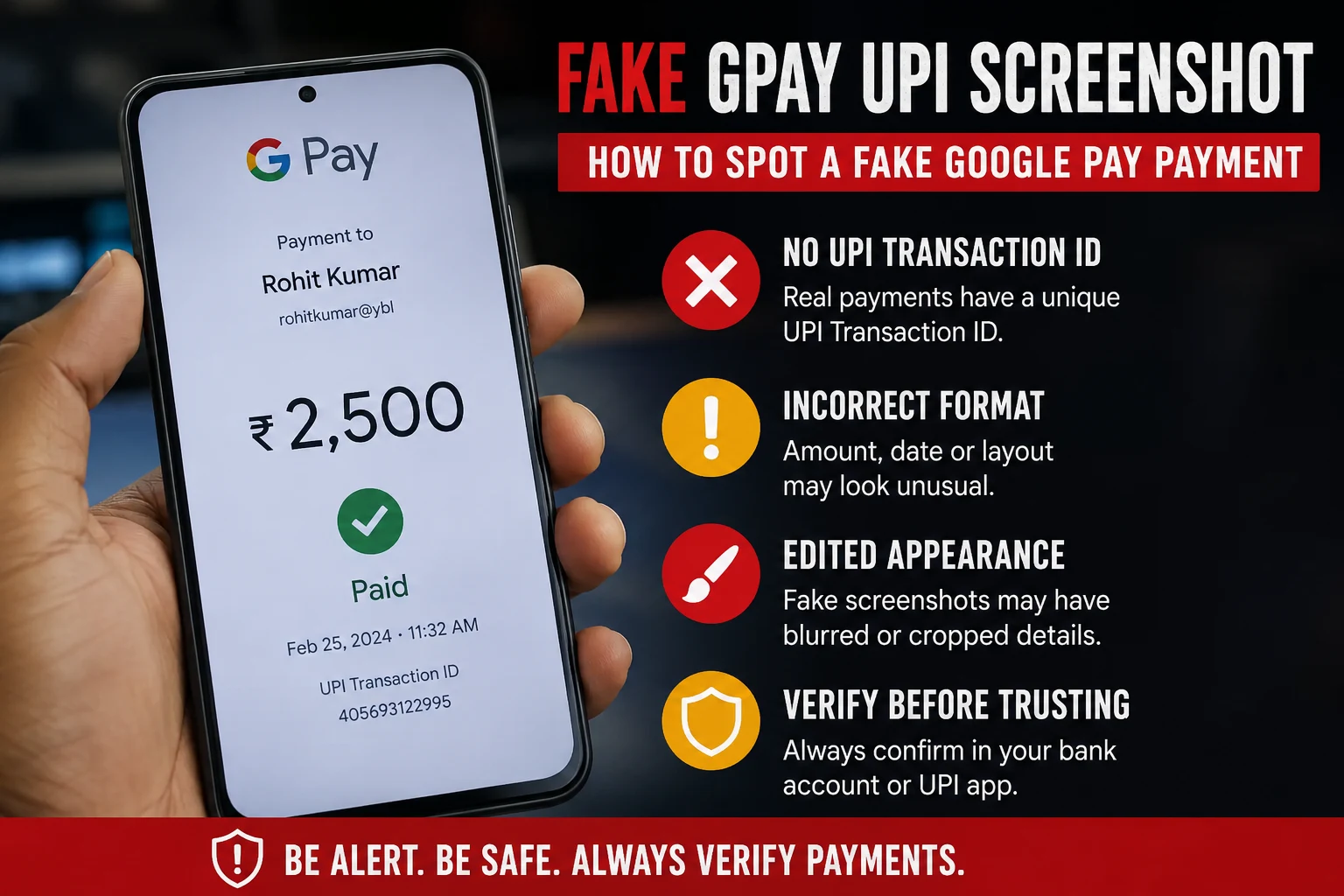
A fake GPay screenshot is a manipulated or fabricated image made to look like a successful Google Pay UPI payment, even though no money was actually transferred. Scammers create these using screenshot editing apps, fake payment generator websites, or by simply copying a real screenshot and changing the amount, name, or transaction ID. You can usually catch a fake by checking three things: the UPI transaction ID (real ones are 12 digits and traceable), the actual bank balance or SMS confirmation (never trust the screenshot alone), and inconsistencies in font, alignment, or timestamp. If in doubt, always verify directly in your bank app or with your bank statement, never through the image someone sends you.
This scam is extremely common with local sellers, freelancers, delivery agents, and small shop owners who accept UPI payments in person and don’t always check their bank balance immediately.
Why Fake GPay Screenshots Work
Fake payment screenshots work because of one simple human habit: we trust what we see instantly and check our bank balance later, if at all.
Scammers rely on:
- Urgency – “I’m in a hurry, please confirm and hand over the item.” (“Bhaiya mai jaldi me hu, please jaldi screenshot dekho, mujhe jana hai.”)
- Trust – Regular customers or people who “seem genuine” get less scrutiny. (“Bhaiya mai toh roz ka customer hu.”)
- Distraction – Busy shop counters, food delivery handoffs, and marketplace deals happen fast. (“Hogaya bhaiya, done.”)
- Familiarity with the UI – GPay’s clean design is easy to copy roughly, and most people don’t examine it closely. (“Lo bhaiya, dekh lo screenshot.”)
By the time the seller checks their actual bank account, the buyer and the goods are long gone.
How Scammers Create Fake Screenshots
Understanding the methods helps you know what red flags to look for.
- Screenshot editing apps – Apps designed to mimic UPI payment success screens, letting scammers type in any name, amount, or UPI ID.
- Photo editing tools – Basic apps like Photoshop or even Canva are used to edit real screenshots and change numbers.
- Screen recording and pausing – Some scammers start a real transaction, then cancel or fail it, and screenshot the “processing” screen before it fails, making it look like a success screen.
- Fake UPI apps – Cloned apps that look identical to GPay but never actually connect to a bank or NPCI network.
- Reused old screenshots – A genuine screenshot from a past transaction with a different person is reused and the name is edited.
Real vs Fake GPay Screenshot: Key Differences
| Feature | Real GPay Screenshot | Fake GPay Screenshot |
|---|---|---|
| UPI Transaction ID (UTR) | 12-digit number, traceable via bank statement | Missing, too short, too long, or random digits |
| Bank balance update | Reflects instantly or within minutes in bank app/SMS | No corresponding SMS or balance change |
| Font and alignment | Consistent with Google Pay’s actual UI, sharp text | Slightly blurry, misaligned, or mismatched font |
| Timestamp | Matches device clock and real-time delivery | Sometimes missing or inconsistent with claimed time |
| Bank SMS/notification | Bank sends a separate SMS confirming credit | No SMS received at all |
| Transaction history in app | Appears in your own GPay/bank transaction history | Cannot be found when you search your own account |
| Sender name spelling | Matches registered bank account name exactly | Sometimes has small spelling errors or odd spacing |
The single most reliable marker is the UTR number combined with your own bank statement. A screenshot is just an image; it proves nothing on its own.
Step-by-Step: How to Verify a GPay Payment
Follow these steps every time before releasing goods, services, or confirming an order.
- Do not rely on the screenshot. Treat it as a claim, not proof.
- Check your bank app or SMS directly. Open your own banking app and refresh the balance, or check your registered mobile number for a credit SMS.
- Match the UTR number. Every real UPI transaction generates a unique 12-digit UTR (also called a reference number). Search this number in your bank statement or passbook.
- Wait for confirmation, not promises. UPI payments are usually instant. If the money hasn’t landed within a couple of minutes, something is wrong.
- Use your bank’s UPI transaction status check. Most banks let you check UPI status by UTR number through their app, net banking, or customer care.
- Call your bank if unsure. For high-value transactions, a quick call to customer care confirms the credit instantly.
- Never accept “it will reflect later.” Genuine UPI payments settle in real time except in rare cases involving pending server issues, which the buyer’s own app will also show as “pending,” not “success.”
Also Read: How to Check If a UPI Payment Screenshot Is Real or Fake (Free Method)
Common Mistakes People Make
- Trusting the sender’s word over their own bank balance. If someone says “check now, I’ve paid,” always check your own app, not their screenshot.
- Handing over goods before the SMS arrives. SMS delays are rare with UPI; if there’s no SMS, don’t proceed.
- Not checking the UTR number at all. Most victims never even look at this number, which is the easiest way to confirm authenticity.
- Assuming familiarity means honesty. Even regular customers or acquaintances have used this trick.
- Confusing “payment initiated” with “payment successful.” Some scammers show the loading screen and claim it’s confirmation.
What to Do If You Receive a Fake Screenshot
- Do not release the product or service until the amount reflects in your account.
- Save the screenshot and any chat conversation as evidence.
- Report the UPI ID to your bank and to the NPCI dispute redressal system if you were misled into an actual loss.
- File a complaint on the National Cyber Crime Reporting Portal (cybercrime.gov.in) or call 1930, India’s cybercrime helpline, if money or goods were lost.
- Block the sender and warn others in your local business or community group if this is a repeat offender.
Prevention Tips for Sellers and Freelancers
- Enable instant SMS/app notifications for every credit to your bank account so you never rely on memory.
- Use a dedicated business UPI ID with alerts turned on, separate from personal use if possible.
- Set a house rule: goods are handed over only after balance confirmation, no exceptions, regardless of how well you know the buyer.
- For high-value or repeat transactions, ask for the UTR number upfront and verify it before proceeding.
- Use a screenshot verification tool that checks formatting, metadata, and common fake patterns before you rely on a payment image alone.
Final Takeaway
A screenshot is not proof of payment. Only your own bank balance, SMS confirmation, and a matching UTR number confirm that money has actually reached your account. Make it a habit to verify before you deliver, no matter how convincing the image looks or how much you trust the person sending it.
FAQs
1. Can a fake GPay screenshot show a real UTR number?
No. A genuinely valid UTR number can only be generated by an actual completed transaction through the UPI network. Scammers either leave it blank, use random digits, or copy a UTR from an unrelated old transaction. Either way, it will not match anything in your bank statement.
2. Does GPay send any confirmation besides the screenshot?
Yes. Every successful GPay transaction triggers an SMS from the recipient’s bank and a permanent entry in their transaction history, independent of any screenshot the sender shows.
3. Can scammers fake the bank SMS too?
It’s technically possible using spoofing tools, but far less common because it requires more technical effort. The safest check is still logging into your own bank app and confirming the actual balance, not just reading an SMS.
4. Is it safe to accept payment and check later?
No. Always confirm before handing over goods or services. “Checking later” is exactly what scammers depend on.
5. What is a UTR number and where do I find it?
UTR stands for Unique Transaction Reference. It is a 12-digit number generated for every UPI transaction, visible in your bank’s passbook, statement, or transaction history, and used to trace or dispute a payment.
6. Are there tools to check if a GPay screenshot is fake?
Yes, several online tools analyze formatting, metadata, and known fake patterns in payment screenshots. However, these should support, not replace, checking your actual bank account.
7. What should I do if I already handed over goods based on a fake screenshot?
Report it immediately to your bank, file a complaint at cybercrime.gov.in or call 1930, and keep all chat and screenshot evidence for the investigation.
8. Do fake screenshots only target sellers, or can buyers be scammed too?
This particular scam mainly targets sellers and service providers who accept payment before delivering. Buyers face different UPI scams, like fake QR codes or “collect request” frauds, which work differently.