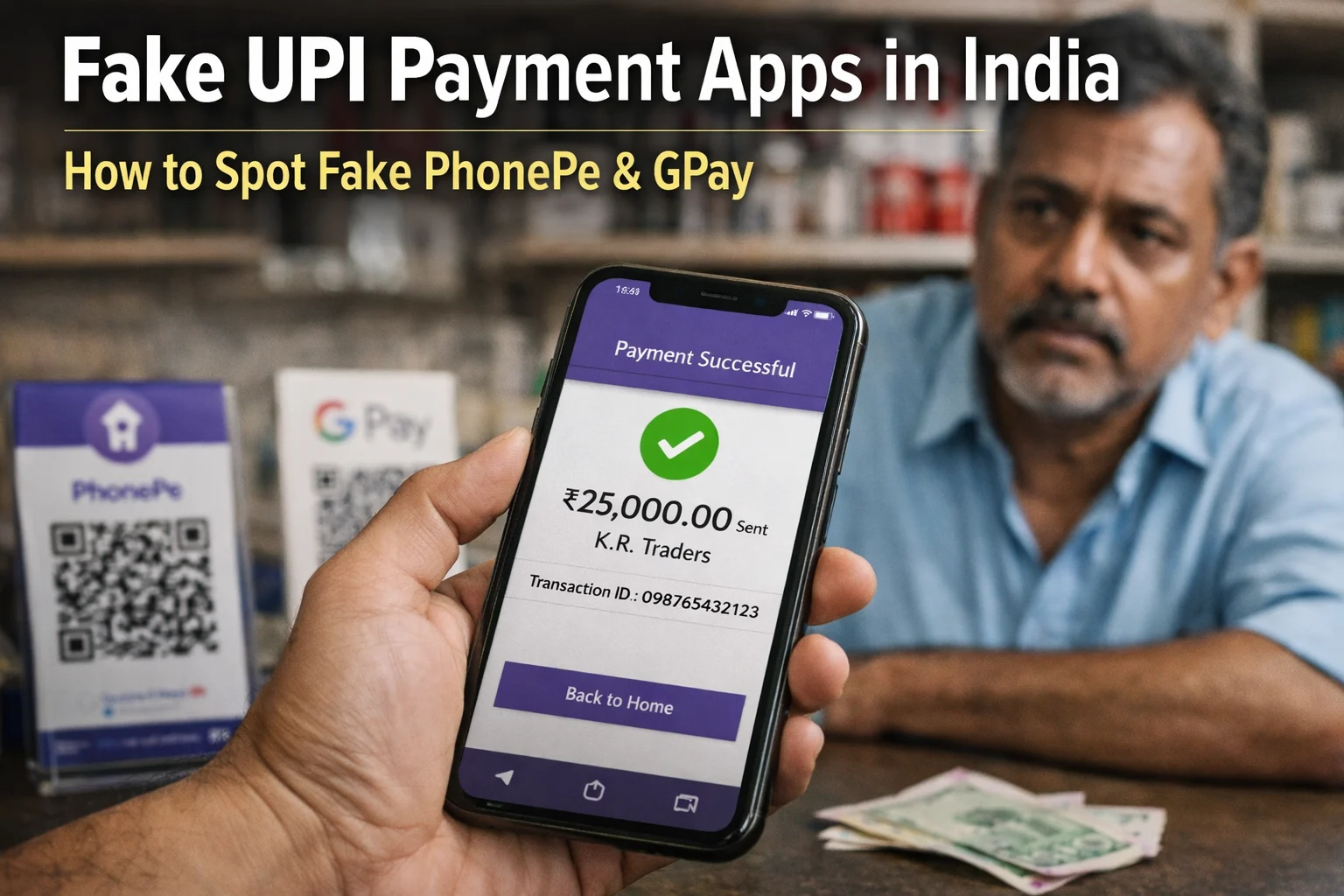
Last month, a mobile shop owner in Bengaluru’s Rajajinagar handed over a phone to a customer who showed a “Payment Successful” screen. Three hours later, when he checked his bank account, the ₹76,000 had never arrived. The app on the customer’s phone looked exactly like PhonePe same colors, same success animation, same notification sound. It just wasn’t real.
This isn’t a one-off case. Asianet News reported that an entire gang is active across Bengaluru targeting small shopkeepers with this exact method. In July 2025, two men were convicted in Arunachal Pradesh for running a similar scam using a fake PhonePe app, as reported by India Today NE. And during Diwali 2025, Gujarat Samachar reported a spike in fake payment app fraud targeting sweet shops and small traders across Gujarat.
Running a tool that analyzes payment screenshots daily, I see this pattern constantly. The fake UPI app isn’t a theoretical threat, it’s in wallets right now, being used at petrol pumps, mobile shops, and vegetable stalls across India. This guide explains exactly how these apps work, how to spot them in seconds, and what to do if you’ve already been scammed.
Disclaimer: This article is for informational and awareness purposes only. It is not legal or financial advice. If you have suffered a financial loss, consult your bank, local police, and the National Cyber Crime Helpline (1930) immediately. Laws and fraud patterns evolve, always verify current guidance with official sources like the Reserve Bank of India and NPCI.
What Is a Fake UPI Payment App?
A fake UPI payment app is a counterfeit Android APK built to look and behave exactly like a real UPI app – PhonePe, Google Pay, Paytm, BHIM, or any popular payment app in India. The fake app copies the real app’s color scheme, logos, success screen, and even the payment confirmation sound.
The critical difference: a fake UPI app never connects to real UPI infrastructure. It doesn’t communicate with NPCI servers, your bank, or any actual payment network. It’s essentially a local animation on the scammer’s phone that produces a convincing illusion of payment.
These are different from fake payment screenshots, which are static images edited with photo tools. A fake app is a live, interactive fraud, the scammer can type any amount, any recipient name, any UPI ID, and produce what looks like a real transaction. Some advanced versions even generate fake transaction IDs and play sounds that imitate the “ting” of a real payment.
Launched by NPCI in 2016, UPI now processes over 21 billion transactions per month as of January 2026, according to official NPCI data.
How Big Is the Problem? Real Numbers from Government Sources
Let me put the scale of this issue in perspective using official numbers, not guesses.
In December 2025, Union Minister of State for Finance Pankaj Chaudhary told the Lok Sabha that India saw UPI-related fraud worth ₹805 crore across 10.64 lakh incidents in just the first 8 months of FY26. For comparison, FY24-25 saw ₹981 crore across 12.64 lakh incidents, and FY23-24 recorded ₹1,087 crore in losses.
A separate LocalCircles survey published in 2025 and covering 32,000+ respondents across 365 Indian districts found that 1 in 5 Indian families using UPI had experienced fraud at least once in the past three years. More worryingly, 51% of victims never reported the fraud meaning the real numbers are almost certainly higher than government records show.
Fake payment apps aren’t the only category in this data, but they’re a growing share. NPCI advisories issued throughout 2025 and 2026 specifically flag counterfeit payment apps as a merchant-targeted fraud category requiring urgent awareness.
The 5 Main Types of Fake UPI Apps Active in India
Not all fake payment apps work the same way. After analyzing the reports flowing into our screenshot checker tool over the last year, I’ve grouped them into five distinct categories. Understanding each type helps you recognize the specific trick being used.
1. Fake PhonePe APK Apps
These are the most common variant in India. The fake PhonePe APK is distributed via Telegram groups, shady third-party app stores, and file-sharing links on WhatsApp. Once installed, the scammer can manually type the merchant’s UPI ID and an amount. The app then shows PhonePe’s signature purple success screen with a transaction ID that looks real but doesn’t exist in any bank’s records.
Real PhonePe transaction IDs are exactly 12 digits and fully numeric. The fake app generates random 12-digit strings they look correct but won’t appear in your PhonePe merchant history or bank SMS.
2. Fake Google Pay / GPay Clone Apps
GPay clones are slightly harder to spot because Google Pay’s success screen is cleaner and less distinctive than PhonePe’s purple branding. The fake versions replicate the GPay logo, the payment confirmation checkmark, and the recipient name field.
A genuine Google Pay transaction generates an alphanumeric UPI reference ID. Fake apps either generate all-numeric IDs (wrong format) or use random alphanumeric strings that don’t match Google’s actual transaction ID pattern.
3. Fake Paytm Mod APKs
According to a News9 report from 2022 (tracking an ongoing pattern that has only grown), Hyderabad police arrested two individuals specifically for using a fake Paytm “spoof app” against shopkeepers in Vanasthalipuram. The app let them enter the shopkeeper’s name, mobile number, amount, and other details then generate a fake payment success page.
Some versions even send a fake SMS to the shopkeeper’s phone to add another layer of false confirmation. The only reliable way to detect these: open your actual Paytm for Business app and check whether the credit is there.
4. Fake Payment Scanner Apps
This is a category most people don’t recognize but it’s growing fast. A fake payment scanner app appears to “scan” a merchant’s QR code and then immediately displays a success screen. The shopkeeper sees the scanning animation and assumes a real transaction happened. No actual UPI network call is ever made.
These scanner-style fake apps are particularly dangerous at petrol pumps and toll counters where staff rarely have time to double-check.
5. Fake Payment Generator Websites (Browser-Based)
Not technically apps, but they operate on the same principle. These are websites where a scammer can enter any amount, any UPI ID, any transaction ID, and generate a realistic-looking PhonePe, GPay, or Paytm screenshot. Some even produce fake sound files.
Search traffic data shows tens of thousands of Indians search for these generator tools every month many innocently (curious or trying to detect fakes), others with clear fraudulent intent.
Fake UPI App vs Real UPI App: Quick Comparison Table
| Feature | Fake UPI App | Real UPI App |
|---|---|---|
| Installation source | APK file from Telegram, WhatsApp, or third-party site | Official Google Play Store or Apple App Store |
| Transaction ID | Randomly generated, doesn’t exist in bank records | Valid UTR visible in sender’s and receiver’s bank |
| Merchant-side notification | None (only customer’s phone shows the “success”) | Instant SMS, app notification, or SoundBox alert |
| Bank account credit | Never arrives | Appears in your account within seconds |
| Settlement record | No trace | Full audit trail in NPCI and bank systems |
| Internet requirement | Often works offline (obvious red flag) | Requires internet to connect to UPI servers |
| UPI PIN prompt for sender | Fake prompt, no real authentication | Real PIN authentication against bank server |
If you can remember just one row of this table: the merchant-side notification. A real UPI payment triggers an alert on your phone or SoundBox. A fake payment only shows success on the customer’s phone.
7 Ways to Spot a Fake Payment App at Checkout
This is a practical checklist you can use in under 30 seconds at any transaction. I’ve ordered these from easiest to most thorough.
1. Check Your Own Device for the Payment
Open your merchant app Paytm for Business, PhonePe Business, or your bank’s UPI app. A real transaction appears instantly. If there’s no credit in your app, there’s no payment. Don’t release goods regardless of what the customer’s phone shows.
2. Listen for the SoundBox Alert (Not Their App)
If you have a Paytm SoundBox, PhonePe Smart Speaker, or any merchant audio device, the confirmation sound should come from your device. A fake app only plays sound from the customer’s phone. As the NDTV Tech coverage of the Hyderabad case pointed out, SoundBoxes are specifically effective against this scam because they’re tied to your actual bank credit.
3. Verify the Bank SMS on Your Phone
Every real UPI credit above ₹100 triggers an SMS from your bank. If your phone hasn’t buzzed with a credit message, the payment didn’t happen. Some fake apps send a fake SMS to the shopkeeper’s number always check that the sender ID matches your bank (e.g., “VK-SBIINB” for SBI, not a random 10-digit number).
4. Look at the Transaction ID Format
Each UPI app has a specific transaction ID format:
- PhonePe: Exactly 12 digits, all numeric
- Google Pay: Alphanumeric, specific pattern
- Paytm: Long numeric string
- BHIM: NPCI standard UTR format (12 digits)
If the transaction ID looks too short, too long, or has letters where it should be numbers only it’s likely a fake.
5. Check if the App Is Actually Online
Ask the customer to show the transaction in their payment history, not just the screenshot of the success screen. Real apps sync with NPCI servers and will show the transaction. Fake apps have no history to sync.
6. Refuse Urgency and Pressure Tactics
Scammers consistently use phrases like “I’m running late,” “show this to your boss later,” or “the network is slow.” The Kerala Police advisory issued via Kerala Kaumudi specifically warned merchants that artificial urgency is one of the strongest indicators of fake payment fraud. A genuine customer will wait 60 seconds for you to verify.
7. Never Enter Your UPI PIN to “Receive” Money
This is critical and widely misunderstood. Entering a UPI PIN always authorizes money going OUT of your account, never IN. If someone says “scan this QR or approve this request to receive your payment,” they’re trying to debit your account, not credit it. The NPCI has issued repeated advisories on this, and RBI Q1 2026 data (as cited by the Nahar Blog analysis of UPI trends) flagged 18 lakh fake collect requests in a single quarter.
Also Read: UPI QR Code Scam: How Fake QR Scanners Are Stealing Money in India (2026)
Fake / Fraud Payment Apps List
- Prank Payment APK
- FakePay – Money Transfer Prank
- FakePe APK
- UPI Payment Generator APK
- Fake Payment Screenshot App
- Fake Pay Receipt Generator
- UPI Screenshot Maker
- Fake Balance Checker App
- GPay MOD APK (fake)
- PhonePe MOD APK (fake)
- Paytm Spoof App
- BHIM Clone APK
- Fake QR Generator App
- Fake Sound Payment App
Real Cases: Fake UPI App Scams That Hit Indian Shopkeepers
- Real cases make the pattern concrete. Here are four documented incidents from across India in the last two years.
- Bengaluru, Rajajinagar (February 2026): A mobile shop owner was defrauded of ₹76,000 when a gang used a fake payment app to show successful UPI confirmation for an expensive smartphone. The Karnataka police is still tracking the suspects, per Asianet News coverage.
- Ruksin, Arunachal Pradesh (July 2025): Two men – Raj Thapa and Boge Sonar, were convicted after using a fake PhonePe app to defraud a local shop. The case was originally registered at Ruksin Police Station in October 2024 and investigated by SI Igel Lollen. Both received two-month prison sentences, according to India Today NE.
- Vanasthalipuram, Hyderabad (2022 onwards): Hyderabad police arrested two people for using a fake Paytm spoof app that could generate fake payment pages with shopkeeper details pre-filled. This case is older but represents a pattern that has only grown, as reported by News9 Live.
- Gujarat Diwali Season (October 2025): Cybercrime officer Hardik Makadia issued a public warning via Gujarat Samachar about a coordinated fake PhonePe and Paytm fraud targeting sweet shops and crowded festive markets across Gujarat. The fake apps displayed credit confirmation messages, but no money actually transferred.
What connects every case: the shopkeeper trusted a screen on the customer’s phone without verifying the credit on their own side. The fix is identical in every case verify on your device before releasing goods.
What to Do If You’ve Already Accepted a Fake Payment
The first hour is critical. Here’s the exact sequence recommended by RBI and the Indian Cyber Crime Coordination Centre (I4C).
Step 1: Call 1930 immediately. This is the National Cyber Crime Helpline. The faster you report, the higher the chance of freezing the scammer’s account before funds are moved through mule accounts.
Step 2: File a complaint at cybercrime.gov.in. Upload screenshots, CCTV footage if available, the scammer’s phone number, and any UPI IDs they used.
Step 3: Inform your bank. File a written complaint about the failed transaction. RBI guidelines on unauthorised transactions protect merchants if they report within specific timeframes.
Step 4: File a local police FIR. Include all digital evidence. Under Section 420 of the Indian Penal Code (cheating) and Section 66D of the IT Act (cheating by personation using a computer resource), using a fake payment app is a criminal offense in India.
Step 5: Preserve evidence. Don’t delete any messages, don’t confront the scammer, don’t block their number before police advise you to. The digital trail helps investigation.
Disclaimer: This is general guidance. Specific recovery outcomes depend on how fast you report, what evidence exists, and how the scammer moved the money. Consult a qualified lawyer for case-specific advice. No tool including ours can guarantee fraud recovery.
How ScamDekho’s Free Tool Helps You Verify
If you receive a payment screenshot and aren’t sure whether it’s real, ScamDekho’s Fake Payment Screenshot Checker runs 8 independent checks on any uploaded image UTR format validation, logo authenticity, font consistency, UPI ID pattern matching, timestamp validation, and template-database comparison against known fake generators.
The tool is free, requires no login, and works for PhonePe, Google Pay, Paytm, BHIM, Amazon Pay, WhatsApp Pay, CRED, and 15+ other UPI apps. It’s designed as a first-pass filter use it alongside (not instead of) checking your own bank account.
For QR code and UPI ID verification, we also have a free UPI & QR Code Checker that flags suspicious handles containing keywords like “support,” “refund,” or “kyc” that are commonly used by scammers.
Final Word
Fake UPI payment apps are a solvable problem. The technology exists on your side to verify every payment in seconds your merchant app, your bank SMS, your SoundBox. The scam only works when someone skips verification because of urgency or trust. Build a simple rule in your shop: no credit on my device, no product out the door. That single habit defeats every fake app in existence.
If you’ve been scammed, report within the first hour by calling 1930 and filing at cybercrime.gov.in. Share this guide with any small business owner you know awareness is still the best defense India has against a problem that costs crores every month.
Frequently Asked Questions
No. Fake apps generate random strings that match the visual pattern of a real transaction ID but don’t exist anywhere in the NPCI, bank, or UPI network. The only way to verify a transaction ID is real is to see it in your own bank statement or merchant app. This is explicitly confirmed by Cashfree’s merchant fraud guide and multiple NPCI advisories.
Yes. Using a fake UPI payment app to defraud a seller is a criminal offense under Section 420 of the Indian Penal Code (cheating) and Section 66D of the Information Technology Act, 2000 (cheating by personation using a computer resource). Both sections carry imprisonment and fines. Victims should file an FIR with local police in addition to reporting to 1930 and cybercrime.gov.in. Consult a qualified lawyer for case-specific advice.
A fake payment screenshot is a static image usually created by editing a real screenshot or using a screenshot generator website. A fake payment app is a live, interactive application that generates new fake confirmation screens on demand. Apps are more dangerous because the scammer can tailor each fake payment to the exact transaction, including merchant name and amount. Our screenshot checker tool can detect both fake app outputs and edited screenshots using visual forensics and pattern matching.
Yes, largely. A Paytm SoundBox, PhonePe Smart Speaker, or any merchant audio device connects directly to your bank account and only speaks when real money is credited. Since fake apps can’t trigger a real bank credit, they can’t trigger your SoundBox either. The caveat: the fake app may play its own sound on the customer’s phone that mimics a SoundBox tone. Always listen for the sound coming from your device, not theirs. This is the specific recommendation from Paytm’s merchant fraud prevention guide and is echoed across multiple NPCI advisories.
About the author: Written by the ScamDekho team. We build free AI-powered tools to help Indian consumers and small businesses detect online fraud — fake payment screenshots, suspicious UPI IDs, phishing URLs, and fraudulent job offers. Our screenshot checker analyzes over 1,000 submissions a month from users across India.