Quick Answer: A fake UPI QR code scam tricks you into scanning a QR code that sends money to the scammer instead of receiving it. Scammers place fake QR stickers over real ones at shops, temples, and parking lots. Always verify the UPI ID name before confirming any payment.
What Is a UPI QR Code Scam?
Most people think scanning a QR code to pay is safe. But there is one thing many Indians don’t know — a QR code can only be used to collect money, not send it to you.
Scammers exploit this confusion every day.
In a UPI QR code scam, a fraudster either:
- Replaces a genuine QR code at a shop or temple with a fake one linked to their own UPI account, or
- Sends you a QR code on WhatsApp/Telegram saying “scan this to receive your payment”
When you scan and pay, the money goes directly to the scammer and there is almost no way to reverse a UPI transaction once confirmed.
According to the Indian Cyber Crime Coordination Centre (I4C), QR code-based fraud is one of the fastest-growing categories of UPI fraud in 2025–2026, with thousands of cases reported across Maharashtra, Delhi, Karnataka, and UP.
How This Scam Actually Works — Step by Step
Understanding the exact method helps you spot it before it’s too late.
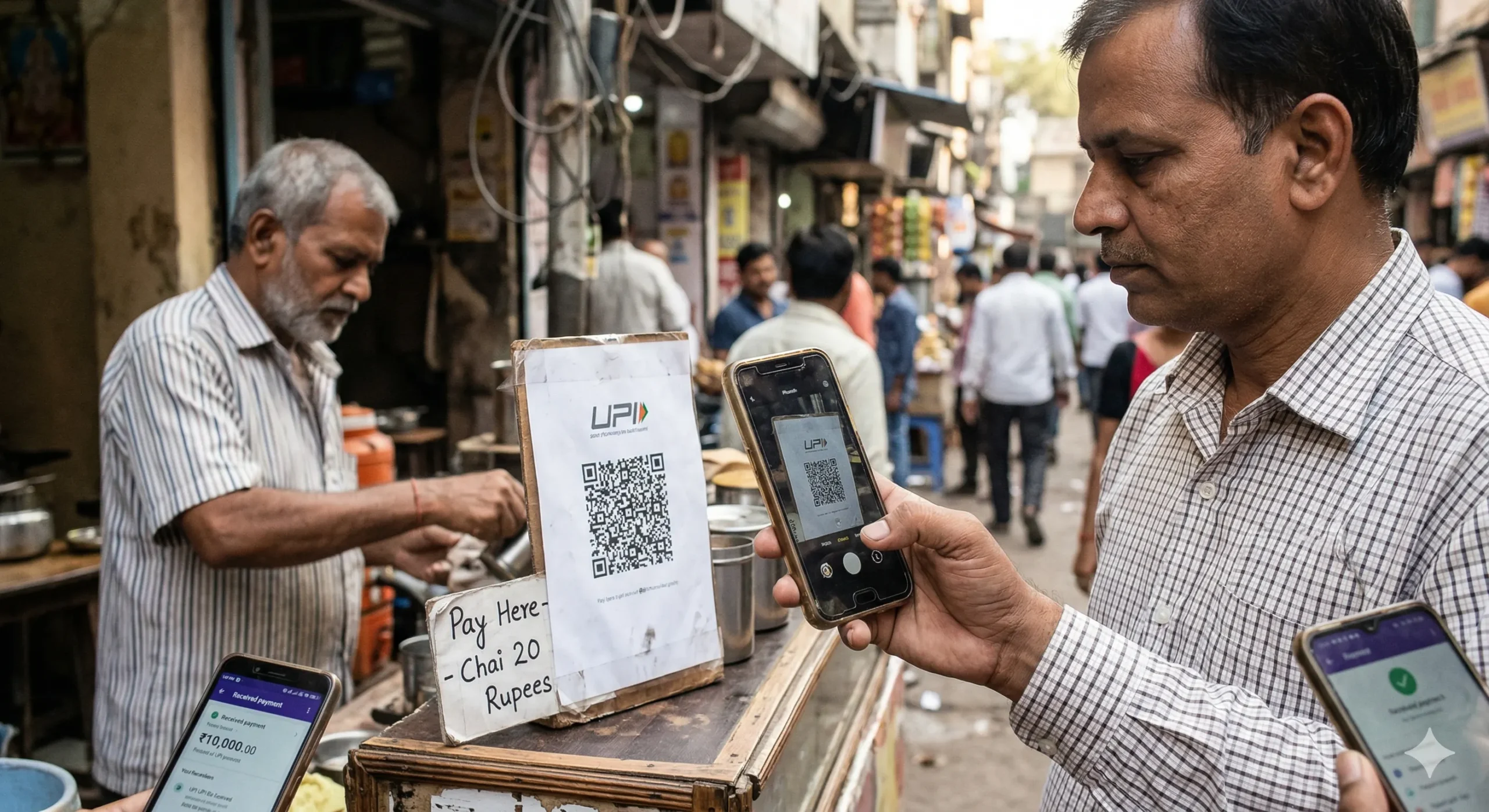
Method 1: The Fake Sticker Scam (Shops, Dhabas, Temples)
- A scammer visits a shop, restaurant, temple donation box, or parking lot
- They paste their own QR code sticker directly over the merchant’s original QR code
- You scan what looks like the shopkeeper’s QR code
- The payment goes to the scammer’s account
- The shopkeeper never receives any money and has no idea
This happens most commonly at:
- Small kirana stores and tea stalls
- Temple donation counters
- Street food vendors
- Parking lots and toll booths
- Petrol pumps in smaller towns
Real case: In January 2026, a Pune-based sweet shop owner filed a complaint after realizing his QR code had been replaced. Over 3 days, customers paid ₹14,000 to a scammer while the shopkeeper received nothing. He only found out when a customer complained that the payment didn’t go through “again.”
Method 2: “Scan to Receive Money” on WhatsApp/Telegram
This is the more dangerous version because it targets individuals directly.
- Scammer contacts you — often posing as a buyer on OLX, Quikr, or a part-time job recruiter
- They say: “We need to send you ₹5,000. Please scan this QR code to receive the payment.”
- You scan the QR code — which actually triggers a payment from your account
- You enter your UPI PIN thinking you’re receiving money
- Money is deducted from your account, not credited
Why people fall for it: Most people don’t realize that entering your UPI PIN is always an authorization to pay, never an authorization to receive. Receiving money on UPI requires no PIN whatsoever.
Method 3: Fake Refund or Cashback QR
- You order something online or at a store
- Scammer (posing as customer care or the seller) says there was an error and offers a refund
- They send a QR code and say “scan this and enter the amount ₹X to get your refund”
- You pay instead of receiving
6 Signs a UPI QR Code Is Fake
| Warning Sign | What to Do |
|---|---|
| QR sticker looks newer or slightly misaligned vs. surrounding surface | Peel corner gently — a fake sticker sits on top of the original |
| UPI ID name after scanning doesn’t match the business name | Do not pay. Ask the shopkeeper to verify |
| Someone sends you a QR code to “receive” money | Refuse. You never need to scan to receive money |
| The QR code is sent via WhatsApp, Telegram, or SMS | Treat it as suspicious by default |
| You are asked to enter your PIN to get a refund or cashback | Stop immediately — this is always a scam |
| Payment amount field is pre-filled and you can’t change it | Red flag — close the app and verify |
How to Verify a UPI QR Code Before Paying
Follow these steps every time — especially for amounts above ₹500.
Step 1: Check the name that appears after scanning
When you scan any UPI QR code, your app shows the registered name before you confirm. Always read it. If you’re paying a shop called “Sharma General Store” but the name shows “Rahul Kumar” or any personal name, stop and ask.
Step 2: Check for sticker layering
At shops and temples, gently check if the QR code is a sticker placed over another surface. Scam QR codes are often printed on plain white sticker paper and look slightly different in texture or color.
Step 3: Never scan a QR code sent via chat to “receive” money
No legitimate payment gateway, employer, bank, or government body will ever ask you to scan a QR code to receive money. This is always a scam, without exception.
Step 4: Use ScamDekho’s UPI QR Checker
Before paying on an unfamiliar QR code, you can verify it using our UPI QR Checker tool. It checks the UPI ID against known fraud patterns and flags suspicious accounts.
Step 5: Confirm with the merchant verbally
For amounts above ₹1,000 at a new shop, just ask the shopkeeper: “Aapka UPI ID kya hai?” and match it to what your app shows after scanning. This takes 5 seconds and can save you thousands.
Who Is Getting Targeted the Most?
Based on cybercrime reports filed across India in 2025–2026, the most affected groups are:
- Small shopkeepers and vendors — whose QR codes get replaced without their knowledge
- OLX and Quikr sellers — targeted with fake buyer “send money” QR scams
- Job seekers — told to scan a QR to receive a “registration fee refund” or “advance salary”
- Devotees at temples and dargahs — where fake QR donation boxes are placed
- Senior citizens — who are less familiar with how UPI sending vs. receiving works
What to Do If You Already Got Scammed
Time is critical. Act within the first 30 minutes if possible.
Step 1: Call 1930 immediately
This is India’s National Cyber Crime Helpline. Report the fraud and provide the transaction ID, UPI ID of the scammer, and amount. They can initiate a hold on the fraudster’s account if acted on quickly.
Step 2: File a complaint at cybercrime.gov.in
Register a formal complaint online. Download your bank statement showing the transaction as evidence.
Step 3: Report to your bank
Call your bank’s fraud helpline and ask them to raise a chargeback or fraud dispute. Success rate is higher if you report within 24 hours.
Step 4: Report the UPI ID on the app
In PhonePe, GPay, or Paytm — go to the transaction, tap “Report an issue” and select fraud. This flags the UPI ID and can help prevent others from being scammed.
Step 5: File an FIR at your local police station
Even if online complaint is filed, a physical FIR strengthens your case for bank recovery.
How Shopkeepers Can Protect Their QR Codes
If you own a business, these steps protect your customers and your revenue:
- Laminate your QR code — A laminated QR code cannot have a sticker placed over it cleanly. This is the single most effective physical protection.
- Check your QR code daily — Spend 10 seconds scanning your own QR code every morning to verify it shows your name and UPI ID.
- Keep a printed backup — Store a backup printout of your original QR code and compare it monthly.
- Affix QR codes to a flat, painted wall — Avoid placing them on portable stands where they can be swapped easily.
- Enable SMS alerts on your UPI account — So you immediately know if a customer paid but the money didn’t reach you.
Check Any Suspicious UPI QR Code Right Now
If you have received a QR code that seems suspicious — from a WhatsApp message, OLX buyer, or job recruiter — don’t scan it on your payment app. Use ScamDekho’s free tool first.
Check a Suspicious UPI QR Code →
You can also check:
- Fake Payment Screenshot Checker — if someone shows you a “proof of payment”
- URL Checker — if someone sends you a suspicious link along with the QR code
- Scam Message Checker — if you received a text message with the QR code
Summary
UPI QR code scams work because they exploit a simple misunderstanding — most people don’t know that you never need to scan a QR code to receive money, and that entering your UPI PIN always means you are paying.
The key rules to remember:
- Always check the name shown after scanning before entering your PIN
- Never scan a QR code sent via WhatsApp, Telegram, or SMS to “receive” money
- Shopkeepers should laminate their QR codes and verify them daily
- If scammed, call 1930 immediately — every minute matters
Stay alert, verify first, pay second.
ScamDekho is India’s free platform for detecting online scams, fake payments, and digital fraud. Our tools are used by thousands of Indians every month to verify suspicious QR codes, payment screenshots, offer letters, and URLs.
Frequently Asked Questions
There is no automatic reversal for UPI payments. However, if you report to 1930 and your bank within a few hours, authorities can freeze the fraudster’s account before they withdraw. Recovery is possible but not guaranteed — act fast.
Generally yes, but always verify the name shown before paying. Even trusted places can have their QR codes tampered with — this has happened at branded outlets in Delhi and Mumbai.
Yes. A UPI transaction is only completed when you enter your PIN and confirm. If you scanned but closed the app before entering your PIN, no money was deducted.
Scanning a QR code alone cannot give anyone access to your account or card details. The risk is only in being tricked into authorizing a payment — not in data theft from the scan itself.
Legitimate employers never pay salaries via QR code. This is almost certainly a scam. Salary credits happen via NEFT/IMPS bank transfers directly, not UPI QR codes.