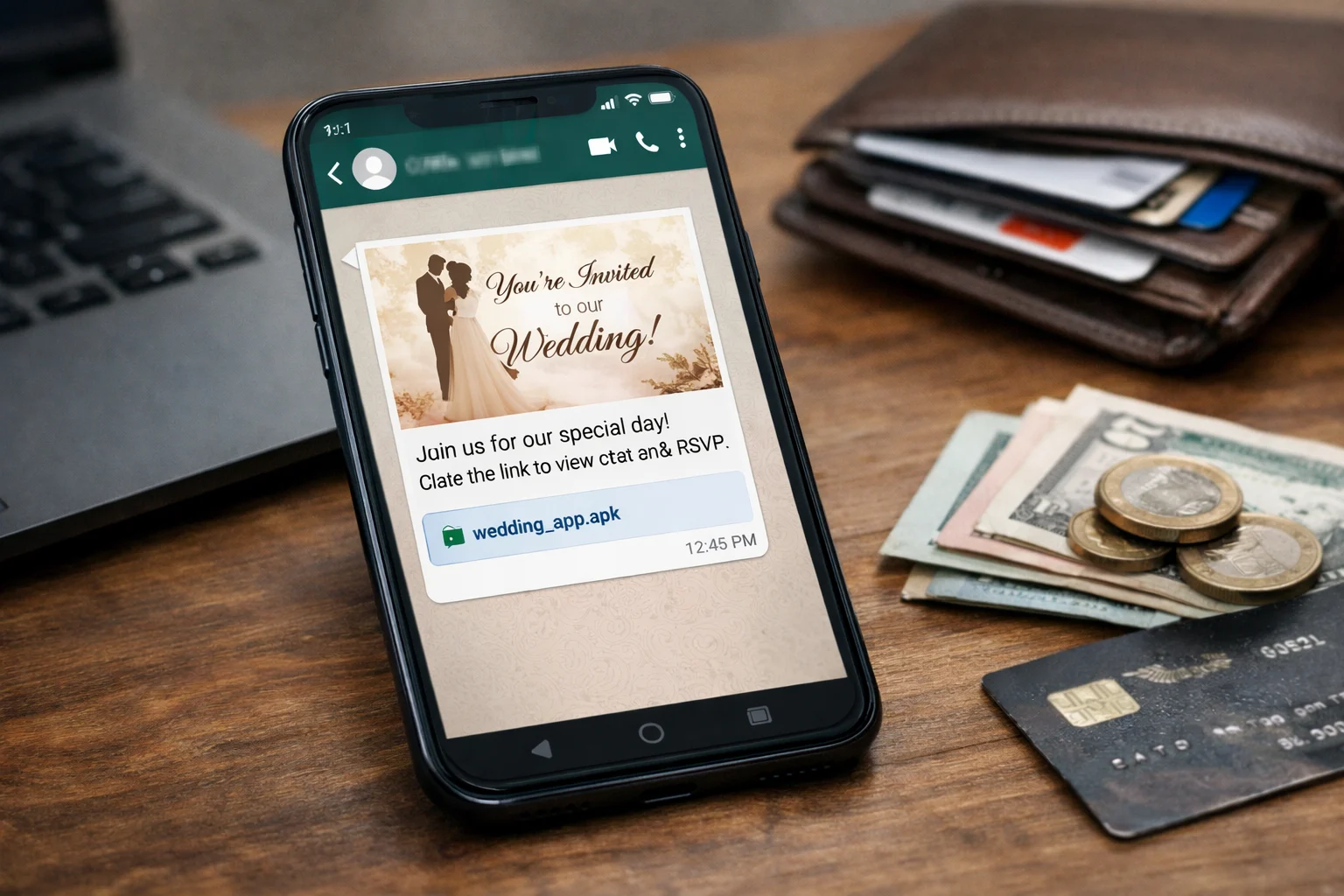
It is peak wedding season in India, and your WhatsApp is flooded with shaadi cards from relatives, old college friends, and distant cousins. One morning, a new message pops up from an unknown number with a familiar tagline: “Welcome. Shaadi mein zarur aana. 30/04/2026. Love is the master key to happiness.” Attached is a neat little file that looks like a PDF invite. You tap it once, the screen flickers for a second, and nothing happens. You think it is broken and move on.
Twelve hours later, your bank account is empty. This is not a hypothetical situation. It is exactly how a Maharashtra government employee lost ₹1.9 lakh and how Rajasthan Police recently warned the entire state. Welcome to the fake wedding invitation APK scam, one of the sneakiest cyber frauds spreading across India right now. This guide breaks down how the scam works, the red flags, and the exact steps to take if you or someone in your family has already tapped that file.
What Is the Fake Wedding Invitation APK Scam?
The fake wedding invitation scam is a malware-based cyber fraud where scammers send a file on WhatsApp that looks like a wedding card but is actually an APK (Android installer file).
When you tap it, a hidden app gets installed on your phone. This app then:
- Reads your SMS inbox (including banking OTPs)
- Accesses your UPI and banking apps
- Copies your contact list to send the same scam to your friends
- Can take screenshots or record your screen in the background
This scam is also known as:
- Shaadi card scam
- Wedding card APK fraud
- WhatsApp malware scam
- Fake e-invite scam
How Big Is the Problem? (Data You Should Know)
This is not a one-off scam. State police departments across India have officially flagged it as a wedding-season epidemic.
| State / Authority | Warning Issued | Reported Incident |
|---|---|---|
| Rajasthan Police | Official X (Twitter) advisory, November 2024 | ₹4.5 lakh lost by single victim |
| Himachal Pradesh CID | Public warning by DIG Mohit Chawla | Multiple family accounts drained |
| Gujarat Police | State-wide social media advisory | Fake cards auto-install malware |
| Telangana Cyber Bureau | Official warning via X | Bank accounts compromised |
| Maharashtra (Hingoli Dist.) | FIR filed | Govt employee lost ₹1.9 lakh |
| HDFC Bank | Customer advisory issued | Warned users against APK files |
According to cybersecurity firm EY, these attacks are significantly more common on Android devices compared to iPhones because Android permits installation of apps from outside the Play Store. The scam peaks between October and February, which coincides with India’s wedding season when 4.8+ million weddings take place annually.
How the Scam Actually Works Step by Step
Here is the exact chain of events scammers follow, reconstructed from police FIRs and cybersecurity advisories.
Step 1: The Unknown Number
You receive a WhatsApp message from a number not saved in your contacts. The profile picture often shows a smiling couple or a floral wedding design to lower your guard.
Step 2: The Sweet Message
The message looks emotionally warm and urgent, usually in Hindi or English:
“Namaste 🙏 Shaadi mein aapka swagat hai. Please open the card and bless the couple. 30/04/2026”
Sometimes the sender even uses a name similar to a known relative, making you assume it is a cousin or distant family member.
Step 3: The Disguised File
Attached is a file named:
Wedding_Invite.apkShaadi_Card.apkInvitation_30-04-2026.apkRahul_weds_Priya.pdf.apk(double extension trick)
On some Android phones, WhatsApp hides the .apk extension, making the file look like a normal PDF.
Step 4: The Silent Install
The moment you tap the file and press “Install” (even once), the malware:
- Installs a hidden app with no visible icon
- Requests permissions for SMS, contacts, and accessibility
- Starts forwarding every OTP to the scammer’s server
Step 5: The Drain
Within hours, the scammer:
- Initiates a UPI or bank transfer from your account
- Intercepts the OTP silently
- Transfers money to mule accounts before you notice
- Uses your WhatsApp to forward the same fake card to your 100+ contacts
Real Case Studies
Case 1: Rajasthan Victim Loses ₹4.5 Lakh (2024) A Rajasthan resident received a WhatsApp message with a file named as a wedding invitation. After opening the file, malware accessed their bank account and drained ₹4,50,000 within hours. Rajasthan Police issued an official public warning afterwards.
Case 2: Maharashtra Govt Employee, Hingoli District (2025) A government employee in Hingoli received a wedding invite from an unknown WhatsApp number with the message “Welcome. Shaadi mein zarur aye. 30/08/2025.” The attached file was an APK disguised as a PDF. Once installed, the malware gave scammers access to his bank account. Loss: ₹1,90,000. An FIR was registered at Hingoli Cyber Cell. Source: NDTV.
Case 3: Kerala Family Loss (2024) Four members of a single family in Kerala received similar wedding APK files and each lost money. Police traced the malware to a remote-access tool based in a different state.
8 Red Flags to Identify a Fake Wedding Invitation APK
If any ONE of these appears, do not open the file.
- The sender is an unknown number not saved in your contacts.
- The file extension is .apk (or looks like .pdf.apk).
- The file size is bigger than 3 MB (real PDF invites are usually under 2 MB).
- The message has urgency: “Please open immediately” or “Just one day left”.
- The sender uses a familiar-sounding name but the phone number is new.
- The profile photo is a generic wedding couple image, often stock photo style.
- The message is forwarded, and shows the “Forwarded” tag on WhatsApp.
- After opening, your phone asks to “Allow installation from unknown sources”.
Important: No legitimate wedding invitation in 2026 is shared as an APK file. Real invites come as PDF, JPG, PNG, or links to Canva/Google Drive/WedMeGood.
Why Android Users Are More at Risk
APK (Android Package) files only run on Android phones, which is why iPhone users are largely safe from this specific scam.
Android allows app installations from outside the Play Store through a feature called “Install from Unknown Sources”. Scammers exploit this feature by:
- Telling users to approve the permission “just this once”
- Using Android’s trust in familiar file icons
- Hiding the
.apkextension behind.pdfnaming
If you want to check whether any suspicious link or file source you received is safe before tapping it, you can quickly verify it through our URL Checker tool. It cross-checks against databases of known malware and phishing domains.
What to Do If You Already Opened the File
Speed matters more than anything. If you realise you opened a suspicious APK, follow this immediately.
Within 0 to 2 minutes
- Turn on airplane mode immediately. This cuts off the malware’s ability to transmit data or OTPs.
- Remove the SIM card from your phone.
- Do not use internet banking or UPI on this phone.
Within 30 minutes
- Go to Settings → Apps, find any unfamiliar app, and uninstall it.
- If you cannot find the app, factory reset your phone. This is the only guaranteed way to remove all traces.
- Call your bank’s 24/7 helpline and freeze your accounts and cards temporarily.
- Change all banking, UPI, and email passwords from a different device.
If Money Has Already Been Transferred
- Call 1930, the National Cyber Helpline, within the first 60 minutes (Golden Hour).
- File a detailed complaint at cybercrime.gov.in with all transaction IDs.
- Visit your bank branch with a written complaint to dispute the fraudulent transaction.
- File an FIR under IT Act Sections 66C, 66D, and IPC Section 420. For a full recovery walkthrough, read our step-by-step money recovery guide.
Disclaimer: This information is for awareness only. For legal action, specific recovery procedures, or financial advice, consult a qualified cybercrime lawyer or certified professional. Recovery of funds is not guaranteed and depends on how quickly you act.
Real Wedding Invite vs Fake APK Invite: Quick Comparison
| Factor | Fake APK Invite | Genuine Wedding Invite |
|---|---|---|
| File Type | .apk (or hidden .pdf.apk) | .pdf, .jpg, .png, or link |
| File Size | 3 MB to 15 MB | Usually under 2 MB |
| Sender | Unknown number, often +92/+84 | Saved contact or close family |
| Message Tone | Urgent, generic, forwarded | Personal, often includes voice note |
| Asks for permissions | Yes, “Install from unknown sources” | Never |
| Designer | None, basic icon | Made on Canva, WedMeGood, or designer cards |
| Link | No link, direct file | Often a Google Drive / Canva link |
How to Check a Suspicious Message Before Opening
If you are ever unsure whether a WhatsApp message is safe, there are three quick safety checks you can do before tapping the file.
- Ask the sender directly by calling them. Never reply on WhatsApp itself, as that account may already be compromised.
- Cross-verify the mobile number with known family members. Most weddings have a single contact person for invites.
- Paste the message text into our scam message checker. It analyses wording patterns, known fraud templates, and urgency markers used in such scams.
Who Is Most at Risk?
Based on police reports and cybersecurity advisories:
- Working professionals (25 to 45 years) receiving genuine wedding invites daily, making fakes harder to spot
- Homemakers and senior citizens less familiar with APK vs PDF difference
- Job seekers and freshers who frequently download files on Android (also covered in our guide on spotting fake offer letters)
- Small business owners whose WhatsApp doubles as a customer channel
This scam specifically targets the emotional trust built around Indian weddings. Nobody wants to offend a distant relative by ignoring their shaadi card, and scammers weaponise exactly this instinct.
Internal Safety Checklist (Print or Save This)
- Never open files ending in
.apkon WhatsApp - Check the file size before opening any invite
- Disable “Install from unknown sources” in Android settings
- Never tap “Allow” when an app requests SMS or Accessibility permissions
- Keep Google Play Protect turned ON at all times
- Never share OTPs, even with people who claim to be from your bank
- Back up your phone regularly so factory reset is not painful
- Teach elderly family members this single rule: if it ends in .apk, do not tap
Final Word
The fake wedding invitation APK scam works because it hijacks the purest part of Indian culture, community, celebration, and shaadi invitations. Scammers know that no Indian wants to be rude to a distant cousin’s wedding invite, and they exploit that social pressure perfectly.
The good news is that this scam has exactly one fatal weakness. It only works if you tap that file. The moment you see an .apk extension on WhatsApp, the entire scheme collapses.
One simple rule to remember: real wedding invitations are never app files. If the filename ends in .apk, it is not a wedding card, it is a thief at your door.
Share this guide with your family WhatsApp group today, especially with parents and older relatives who receive the most wedding invites. That one forward could save someone lakhs.
This article is for educational and awareness purposes only. It does not constitute legal or financial advice. If you are a scam victim, please consult a qualified cybercrime lawyer and your bank immediately.